Flashcards
Review that adapts to your memory — surfacing each card again right before they'd forget it. The cards aren't random; they come straight from your own stories and talks.
The tab on your phone is called Cards (卡片). Inside it, Flashcards is the review screen — that's the name we use in this guide. Cards is where your deck lives; Flashcards is how you review it.
The Cards tab — decks
Open Flashcards and you'll see two review decks, a radical review mode, and a pronunciation listening quiz — and this is the real advantage of how Chinese works, made simple:


Characters → words → sentences
Chinese builds up in layers, and Bamboo Island reviews each layer so the whole structure holds together:
- A character can stand alone as a word — e.g. 今 can mean "now".
- Characters combine into words — 今 + 天 = 今天 ("today"). The same characters form many different words, so knowing the parts isn't enough; you must also recognize the whole.
- Words combine into sentences — 今天 + is + my + birthday. This is where real reading and conversation happen.
That's why there are two decks. The Characters deck fixes the meaning of each building block; the Words deck fixes how those blocks combine. Review a little of each daily, and you can move from recognizing a single character all the way to reading full sentences.
Because words are built from characters, it's best to learn the characters in a word before reviewing the word itself. When you already knows 今 and 天, the word 今天 becomes easy — they recognize both parts instantly instead of memorizing an unfamiliar shape. So in each session, start with the Characters deck, then move to Words. The building blocks make the combinations stick.
| Deck | What it teaches | Example |
|---|---|---|
| Characters 单字 | The meaning of each single character on its own. These cards get the 📖 Make story and ✍️ Writing practice buttons. | 今 = "now/today" |
| Words 词语 | The meaning of whole multi-character words — how characters combine. This is where real reading happens. | 今天 = "today" (今 + 天) |
What is spaced repetition?
If you reviews a word today, they might forget it in two days. But if they review it again just before they forget — then again a week later, then a month later — the memory gets stronger each time, and the gaps grow longer. This is spaced repetition, and it's the most effective known way to lock vocabulary into long-term memory.
Bamboo Island schedules each card automatically. You doesn't decide what to study — the app shows them exactly the words that are due, no more, no less. A short daily session is all it takes.
You never build the deck by hand, and you never assign sounds by hand either. The moment you create or edits a story or talk, Bamboo Island does all of this in the background:
- Breaks each character down into its four ingredients — its initial (consonant), final (vowel ending), tone, and radicals (shape parts) — automatically, using the standard pinyin chart.
- Creates review cards — a character card and a word card for every character and word in the text, so both decks fill at once.
- Seeds the character in "My Characters" (see Remember) with its radical breakdown and ingredient assignments already filled in — ready for a memory story whenever you opens it.
So there's no setup, no importing word lists, no manual data entry. You just writes stories and talks about their own life — and the app quietly builds the entire learning system (review deck + character breakdowns) underneath. The more they read and converse, the richer everything grows, filled with words that are meaningful to them.
A daily review session
-
Open FlashcardsTap Flashcards on the home screen, then pick a deck — Characters or Words. Each shows how many cards are due today. A third mode, Radical Review, lets you write each radical of the character to reinforce the shape-memory from Remember, and a fourth, Pronunciation, is a listening quiz for your ear.
-
Review each cardSee the card, try to recall it, then reveal the answer. Mark how well you knew it — the app uses your response to schedule the next review. Hard cards come back soon; easy ones wait longer.
-
Finish when the deck is clearA session ends when today's due cards are done — usually just a few minutes. Come back tomorrow for the next batch.
The Characters deck (单字)
The Characters deck fixes the meaning and sound of each single character. These cards get the full treatment — grade buttons, stroke-writing practice, and the Make Story memory method.
The review card and the 4 grade buttons
Each card has two sides. First you see only the character — for example 今 (jīn, "today"). You try to recall its sound and meaning, then tap 👁 Show answer to reveal the pinyin, English, and a sample sentence. Then you grade how well you knew it with one of four buttons:

| Button | Color | When to tap it | What happens |
|---|---|---|---|
| Again | 🔴 Red | You didn't know it (forgot or blanked). | The card comes back right away, later in this same session — so you see it again soon and has another go. |
| Hard | 🟠 Amber | You got it, but it was a struggle. | Passed for today, but it comes back sooner than the others — a short delay. |
| Good | 🟢 Green | You knew it (the normal, expected answer). | Passed for today, scheduled to a normal interval. This is the button to tap most of the time. |
| Easy | 🔵 Blue | You knew it instantly, no effort. | Passed for today, with the longest delay — it won't bother you again for a long time. |
The simple rule for you: tap Again (red) if you didn't know it, and otherwise pick how easy it felt — Hard (amber), Good (green), or Easy (blue). The color makes the choice obvious without reading. The app does all the timing math.
✍️ Writing — watch it written, then practice it yourself
On any single-character card, the ✍️ Writing button (with a counter like 0/3) opens a stroke panel where you can learn the character's strokes two ways:


- ▶ Play — animates each stroke in order, so you see exactly how the character is written (stroke direction, sequence, and shape). Watch it a few times to learn the form.
- ✍️ Practice — you trace the strokes themselves with their finger on the grid. The app checks each stroke and only counts a try as correct when it's traced accurately enough. Complete a full clean pass to earn one practice point.
The counter (e.g. 3/3) tracks progress toward the learned threshold — the number of complete practice passes needed to mark the character ★ learned. That number is customizable: in Settings → Writing practice → Learned threshold you can set it from 1 to 10 (the default is 3). A younger learner might need more passes (raise it); a more experienced one might need fewer (lower it). The stroke grid (田字格 field or 米字格 rice), how strict the tracing is, and the animation speed are all adjustable there too.
📖 Make story — the heart of the Bamboo Island System ⭐
This is where everything comes together. On any single-character card, the 📖 Make story button opens a screen that decomposes the character into all four ingredients — radical, initial, final, and tone — and helps you weave them into one vivid memory story. It's the moment the four libraries pay off.
Here's the whole process, top to bottom, shown for the character 今 (jīn, "today"):
1 · The character and its sound
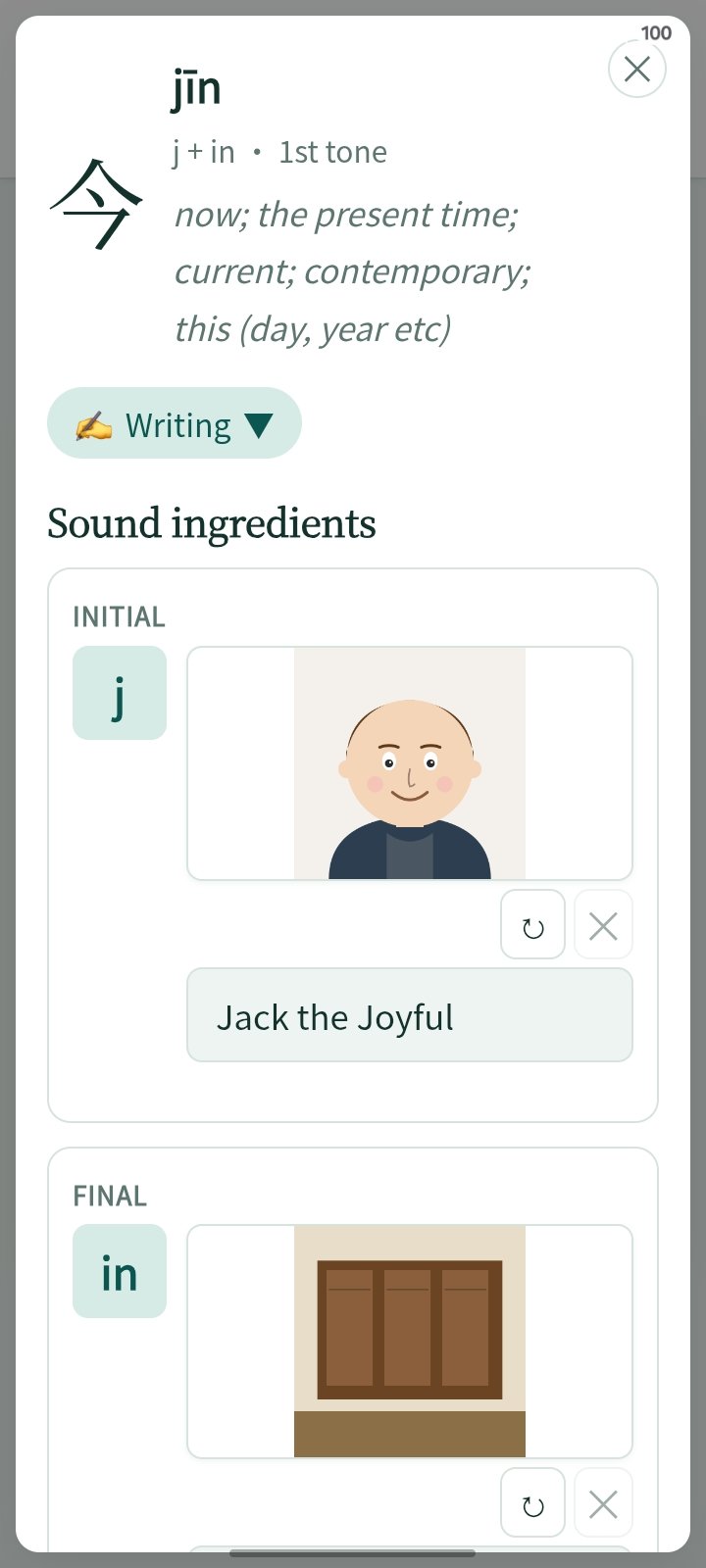
The header shows the character, its pinyin, and a line breaking its sound into pieces — e.g. j + in · 1st tone — plus the English meaning. A collapsible ✍️ Writing chip lets you practice the strokes right here too.
2 · The sound ingredients — person, place, voice

The Sound ingredients section shows the three pieces of the character's sound, each pulled from the libraries you already built — and editable right here:
- Initial — the person (e.g. the one assigned to j)
- Final — the place (e.g. the room assigned to -in)
- Tone — the voice (e.g. the family member for tone 1)
Below them, the Radicals appear as numbered chips showing each shape-part of the character. A voice picker and ▶ Listen button let them hear the character spoken.
3 · Write the story (or let AI draft it)

Finally, the Story section. The app shows a prompt built from the ingredients (something like "Tell a story using [person], [place], [voice], and [radicals] — link the shape, the sound, and the meaning"). You can:
- Write it themselves in the text area (or 🎤 speak it).
- Tap ✨ Draft to let the AI write a first draft from the ingredients (needs an AI key — see Settings → AI), then edit it.
- Tap ▶ Listen to hear the story read aloud.
When the story feels right, tap 💾 Save. That one vivid scene — person in a place, with a voice, built from the character's own shape — is what you will remember.
Reviewing a card over and over builds familiarity, but a story builds a real memory. Make Story turns each character into a scene you can't forget — and every time that card comes up in review, the story is right there to remind them. This is the whole Bamboo Island System in one screen. (See The Bamboo Island System for the worked example with 八 bā.)
The Words deck (词语)
The Words deck fixes the meaning of whole multi-character words — and this is where real reading happens. Knowing each character isn't enough, because the same characters combine into many different words. (For example, 天 means "sky/day" alone, but it appears in 今天 "today", 天气 "weather", 星期天 "Sunday"...) The Words deck makes sure your you recognize these combinations instantly.

Reviewing a word card
A word card works the same reveal-and-grade way as a character card — Show answer to flip, then the same four color-coded grade buttons (Again / Hard / Good / Easy). The back shows the word's pinyin, meaning, and a sample sentence, just like a character card.

The four grade buttons are color-coded the same way on every card — a traffic-light progression from "forgot" to "instant":
| Button | Color | When to tap | What happens |
|---|---|---|---|
| Again | 🔴 Red | Didn't know it. | Comes back right away, later this session. |
| Hard | 🟠 Amber | Got it, but struggled. | Passed today; comes back soon (short delay). |
| Good | 🟢 Green | Knew it (the normal answer). | Passed today; normal interval. Tap this most often. |
| Easy | 🔵 Blue | Knew it instantly. | Passed today; longest delay — won't return for a long time. |
The simple rule: Again (red) if you didn't know it, otherwise pick how easy it felt — Hard (amber), Good (green), or Easy (blue). The color makes the choice obvious without reading.
The only difference from a character card is on the front: word cards show just Show answer and Read aloud — the 📖 Story and ✍️ Writing buttons are character-only, since a memory story is built per character and you trace one character at a time. Everything else is identical.
The Radicals deck (部首)
The third tile on the Cards page is a different kind of review. Instead of reveal-and-grade, Radical Review asks the learner to write each radical of a character, one at a time, using the same stroke-order canvas — while each radical's picture mnemonic sits right beside the glyph. The hand and the story learn together: it's the bridge between practicing cards and practicing memory.
- Each character is broken into its radicals automatically (from the Remember decomposition).
- Write one radical → it reveals the mnemonic picture and label from your Remember libraries.
- After writing all radicals, grade with the same 4 buttons (Again / Hard / Good / Easy).
- Runs on its own due count and schedule, separate from Characters and Words — finishing one deck doesn't finish the others. Every radical you practice still counts toward your streak.
The strokes are drawn in the practice color you chose in Settings, and everything you review here feeds the Radicals row of the Learning Report below. New to radicals altogether? The whole library — all 214 with their pictures — lives in Remember → Radicals.
It's a powerful way to reinforce shape-memory: instead of recognizing the whole character, you rebuild it from its parts, one stroke-group at a time.


The Pronunciation deck (发音)
The fourth tile is a different kind of review: a listening quiz. A sound plays — no text on screen — and the learner picks its pinyin from four deliberately similar choices, usually the four tones of the same syllable (mā má mǎ mà) or a confusable pair (zāng/zhāng, nǎo/lǎo). You can't guess from spelling; you have to hear it.
- Sounds come from your content, exactly like the Characters and Words decks: every syllable with a tone that appears in your stories, talks, or lessons joins the deck automatically. The tile's number is how many sounds you've met — nothing to set up, and it grows as you read.
- A tip for every sound: under the choices, each card carries its own one-line tip, anchored on a word you can say out loud — "n sounds like the n in no", "r sounds like the s in measure", and the classic "d sounds like the t in stay". One idea at a time, exactly when you meet the sound.
- Right pick: a green ✓ shows the pinyin, the hanzi, and a small tone ladder for about a second, then the next sound plays automatically — a fast, game-like rhythm.
- Wrong pick: your choice turns red, the correct one green, and the reveal shows the pinyin, the carrier hanzi, and a 5-line pitch ladder with the tone's shape drawn beside it — you SEE the tone you just heard. Then grade with the same 4 buttons (Again / Hard / Good / Easy) — the sound comes back later in the same session until you hear it right.
- Runs on its own due count and schedule (the same SRS as your other cards), and Settings → Rebuild regenerates this deck along with the rest. Turn the phone sideways and the grade buttons float up from the bottom — always reachable.
Why it matters: tones and the retroflex initials (zh/z, sh/s, ch/c, n/l, f/h) are the hardest things for a learner's ear. This deck drills exactly those distinctions, a few sounds at a time, every day. Want to browse every sound first? Try the free Interactive Pinyin Chart on this site — click any syllable to see and hear its four tones.


Learning Report
Under the decks, the 📊 Learning Report shows both sides of every deck — Characters, Words, and Radicals — so you can see progress at a glance:
- 💪 Know well (solid) — remembered for 2+ weeks. These are the characters, words, and radicals that have really taken root.
- 🧗 Needs more practice (tricky) — still being forgotten. A card leaves this list once it holds for two weeks — until then, it's worth a little extra attention.
- 📈 Weekly progress — how many cards became solid this week, the parent-friendly progress signal.
Tap 🧗 Practice the tricky ones to drill just the cards that are due and struggling — one tap, no picking. And tap any character in the report to open its Remember page, where you can give it a stickier story: the report tells you what needs work; the memory palace is where you fix it.


How review fits the day
Remember the cup and the clay: the solid half-hour is for new stories, talks, and the memory palace. The empty spaces — the five minutes before dinner, the walk to school — are perfect for a quick flashcard session. The half-hour builds; the gaps keep it alive.
Consistency beats intensity.
A little every day beats a lot once in a while. In Settings → Review, set a daily reminder so review becomes a fixed part of the routine — the "empty spaces" in the day that reinforce the solid half-hour of study.